
Your docs, instantly chat-ready
Upload any file, knowledge base or recording and let Infera Notebook answer questions, build FAQs, generate notes, slides and narrated studio overviews with citations you can trust.
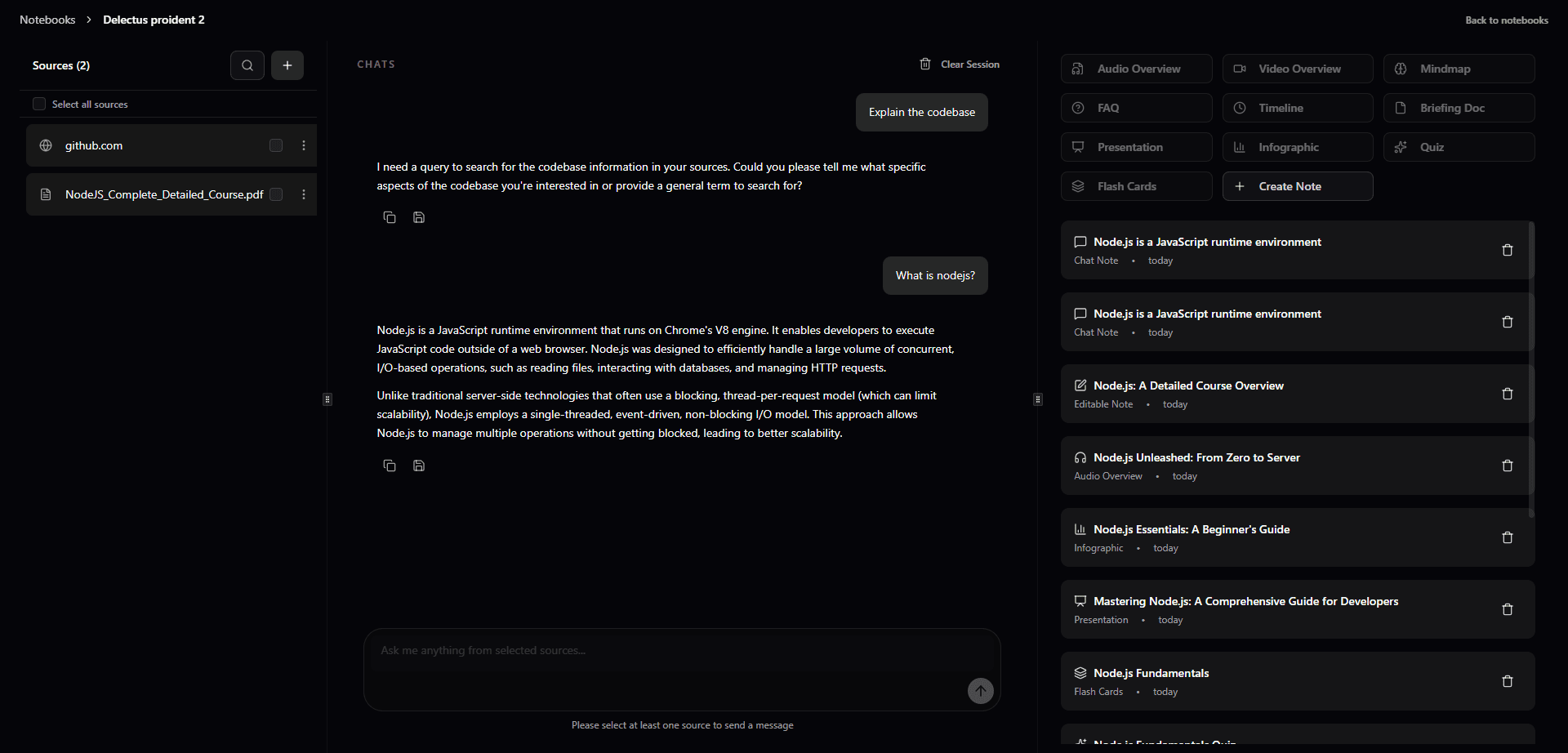
Workspace outputs
Everything after the upload happens in one place
Generate conversations, insights, FAQs, notes, slides and studio overviews from the same context-aware chat so your team never has to start from scratch again.
Chat with any file
Drop PDFs, slides, emails or audio and start a grounded conversation in seconds.
- Supports PDF, DOCX, PPTX, CSV, audio and public links
- Cited answers with page or timestamp references
- Shareable chat threads for teammates or clients
Insight layer
Summarize collections, spot themes and surface the metrics that matter.
- Auto tagging, clustering and topic timelines
- Insight cards with key numbers and sentiment
- Pin highlights into reports or dashboards
AI FAQ builder
Generate canonical answers and publish them as help-center ready articles.
- Batch question generation from any corpus
- Review + edit mode with tracked changes
- Export to web widgets, PDF or Markdown
Living notes
Turn any chat into collaborative notes that stay linked to the source material.
- Multi-author blocks with version history
- Embed charts, media and code blocks
- Sync directly to Notion or your knowledge base
Slide generator
Create presentation-ready decks with branded layouts and speaker notes.
- Outline or storyboard mode in one click
- Auto-themed slides that match your palette
- Export PPTX, Google Slides or PDF
Studio overview
Give stakeholders a narrated walkthrough of everything the AI uncovered.
- Audio and transcript overview with chapters
- Storyline mode for executive rollups
- Secure, expiring share links and embeds
Features
Built for teams who demand more
Enterprise-ready features that scale with your team and keep your data secure.
Lightning-fast processing
Upload and process documents in seconds with our optimized AI pipeline.
Enterprise-grade security
SOC 2 compliant with end-to-end encryption and granular access controls.
Cloud-native architecture
Built for scale with automatic backups and 99.9% uptime guarantee.
Team collaboration
Real-time collaboration with mentions, comments, and shared workspaces.
Use cases
Upload, chat and publish for every team
Whether you need instant answers, insight summaries, auto-generated FAQs, living notes, decks or a studio overview, Notebook keeps every output connected to the exact document it came from.
Customer support co-pilot
Unify policies, macros, transcripts and release notes so agents never leave the chat window.
- Chat with every SOP, policy and prior ticket in context
- Publish verified FAQ collections that stay in sync
Revenue & success desks
Prep customer meetings with AI-written briefs, notes and slides sourced from the same uploads.
- Generate deal or account insights in one click
- Spin up slides + follow-up notes with citations
Ops & research teams
Compare lengthy docs, interviews and spreadsheets to uncover trends and share narrated recaps.
- Auto-tag insights across interviews or audits
- Send studio overviews with audio + visual context
Learning & enablement
Build living notes, FAQ hubs and training decks that update whenever the source material changes.
- Keep notes, FAQs and slides linked to the source
- Stream audio overviews for async onboarding
Insights
Every answer is cited, measurable and ready to publish
Notebook keeps the full lineage from upload → chat → FAQ → notes → slides → studio overview so you can prove where every insight was generated.
Questions answered without leaving the workspace.
Grounded, cited responses for every stakeholder.Average time to publish a verified FAQ article.
Draft, review and push live from one screen.Generate narrated audio + slide recaps instantly.
Share secure links or embed in status docs.Upload anything
Drag and drop PDFs, DOCX, PPTX, CSV, audio, video and URLs or sync from Drive, Notion and Slack.
Files · Links · APIsOrganize context
Group docs into collections, set permissions and let Notebook auto-tag entities and timelines.
Collections · Spaces · TagsAsk & iterate
Chat, mention teammates, create notes, FAQs or action lists that stay linked to the original content.
Chat · Notes · TasksPublish in one click
Ship insights, FAQ hubs, slides and narrated studio overviews with citations you can share anywhere.
Insights · FAQs · Slides · StudioTestimonials
Trusted by teams across industries
See how teams are transforming their workflows with Infera Notebook.
"Notebook transformed how our support team works. We cut response time by 60% and our agents love having instant access to every policy and FAQ."
"The deal briefs and account insights are game-changers. We're closing more deals because we're always prepared with the right context."
"Processing hundreds of research papers and interviews used to take weeks. Now we get comprehensive insights and summaries in hours."
Integrations
Works with the tools you already use
Connect your existing workflows and sync data seamlessly across platforms.
FAQ
Frequently asked questions
Everything you need to know about Infera Notebook.
What file types does Infera Notebook support?
We support 50+ file types including PDFs, DOCX, PPTX, CSV, audio files (MP3, WAV), video files (MP4, MOV), images, and public URLs. You can also sync directly from Google Drive, Notion, and Slack.
How secure is my data?
Security is our top priority. We're SOC 2 Type II compliant with end-to-end encryption, granular access controls, and regular security audits. Your data is never used to train our models without explicit consent.
Can I collaborate with my team?
Yes! Notebook supports real-time collaboration with shared workspaces, mentions, comments, and version history. You can set permissions at the collection or document level.
How accurate are the AI-generated insights?
Every response includes citations linking back to the source material. Our models are fine-tuned for accuracy and you can review, edit, and verify all generated content before publishing.
Can I export my work?
Absolutely. Export FAQs as Markdown, PDF, or web widgets. Slides can be exported as PPTX, Google Slides, or PDF. Notes sync to Notion or can be exported as Markdown.
What's included in the Studio overview?
Studio overviews include narrated audio walkthroughs with transcripts, visual slide decks, and secure shareable links. You can customize the narrative and set expiration dates for shared links.
Get Started
Ready to transform your documents into interactive knowledge?
Start creating notebooks, chat with your documents, and generate FAQs, notes, slides, and studio overviews. Join teams already using Infera Notebook to unlock insights from their content.